
When you first create a Facebook Business Page, the default web address often looks something like this:
https://www.facebook.com/profile.php?id=100064188232961
Not ideal, is it? That long string of numbers isn’t very memorable — and it doesn’t look great when you display it on your website, business cards or email signature.
Good news:
You can change it to something clean and branded like this:
facebook.com/yourbusinessname
It's really quick & easy to do and it makes your business easier to find, share and remember.

Why Should I Change My Facebook Business Page URL?
Here’s why it’s worth doing:
-
It looks more professional – especially on your website and printed materials.
-
It’s easier for people to find and remember your page
-
Improves your online visibility – a clean URL can help with search engine rankings, especially when consistent across platforms.
-
Builds trust – visitors feel more confident clicking a clear, branded link.
Think of it like claiming your shop sign online – it’s part of making your business easier to find and identify across the web.
How to Change Your Facebook Page URL (Step-by-Step)
You’ll need to be an admin of the page to do this.
Open Facebook and head to your page as an admin.

Step 1. Go to Settings
From your business page, click on settings (under the manage page panel on the left)

Step 2. Go to Page Setup
Under Audience & Visibility, click on Page Setup
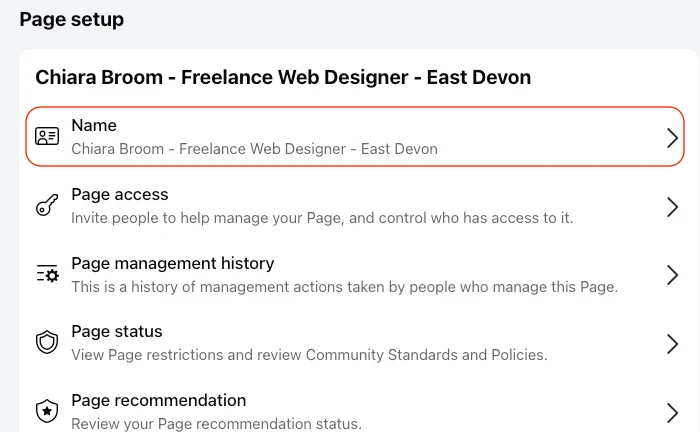
Step 3. Click on the section "Name"
Then edit your username under the heading "general page settings"
Save and exit the settings.
A Few Things to Keep in Mind
-
Keep it simple and clear – avoid adding extra numbers unless necessary.
-
Be consistent – try to match your Instagram handle and website name if possible.
-
You can only change it once – so double check for typos!
-
Some new pages may need to meet certain conditions (like having a few followers) before you can customise your username.
Final Thoughts
Changing your Facebook Business Page URL is a quick win and one that makes your business look more polished and helps with visibility across the web.
If you're serious about growing your online presence, small tweaks like this add up.
If you found this helpful, feel free to share it or ask me about other simple tweaks to boost your website and online visibility. I’m always happy to help.